Issue #691 (Fimo Review, CSS/HTML, Testing, Uncats)10/15/26
The following is a paid product review for Fimo, a platform that completes your AI website building stack, allowing you to build autonomous, team-editable websites that agents maintain.
I come across dozens of AI website builders and CMS-related tools these days. The gap between the CMS-powered website and AI tools tends to be large. But this week I'm looking at a new tool that aims to bridge that gap.
That tool is Fimo, an autonomous website building platform for individuals and teams, that works with your current stack and coding agent. Fimo comes from the same team that built Strapi, the popular open source CMS.
Fimo brings the following features to modern AI-powered coding and website and app building:
- Bring your own AI stack – Whether you're using Claude, Codex, Cursor, Copilot, or something else, Fimo hooks right in, making your site editable and ready for ongoing automations.
- Build custom agents – Fimo lets you create your own agents, with skills built in, so you can autonomously stay on top of website editing, SEO updates, translations, and more.
- A Visual Editor – Fimo offers an AI-powered CMS that anyone can edit – marketers, copywriters, developers, and others.
- One-click Deploy – Publish your websites with your custom domain and own your own code (real code, no lock-in) that you can move wherever you want.
Let's look at these and other features in more detail as we take Fimo for a little test run.
Getting Started with Fimo
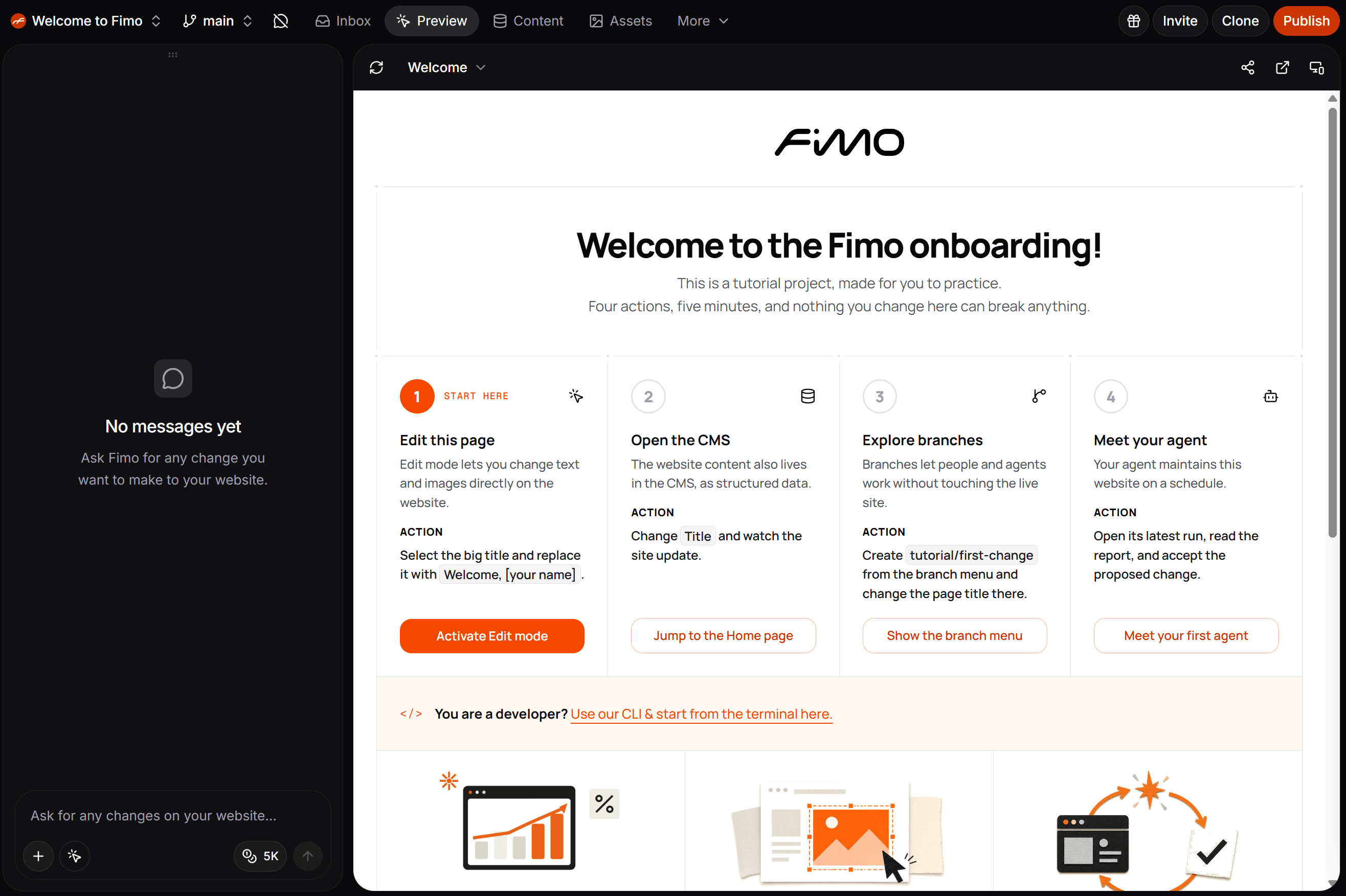
When you sign up for an account, Fimo immediately brings you to your dashboard where you'll have the option to try out a tutorial project that's ready to go. Your first Fimo project is ready to test when you sign up
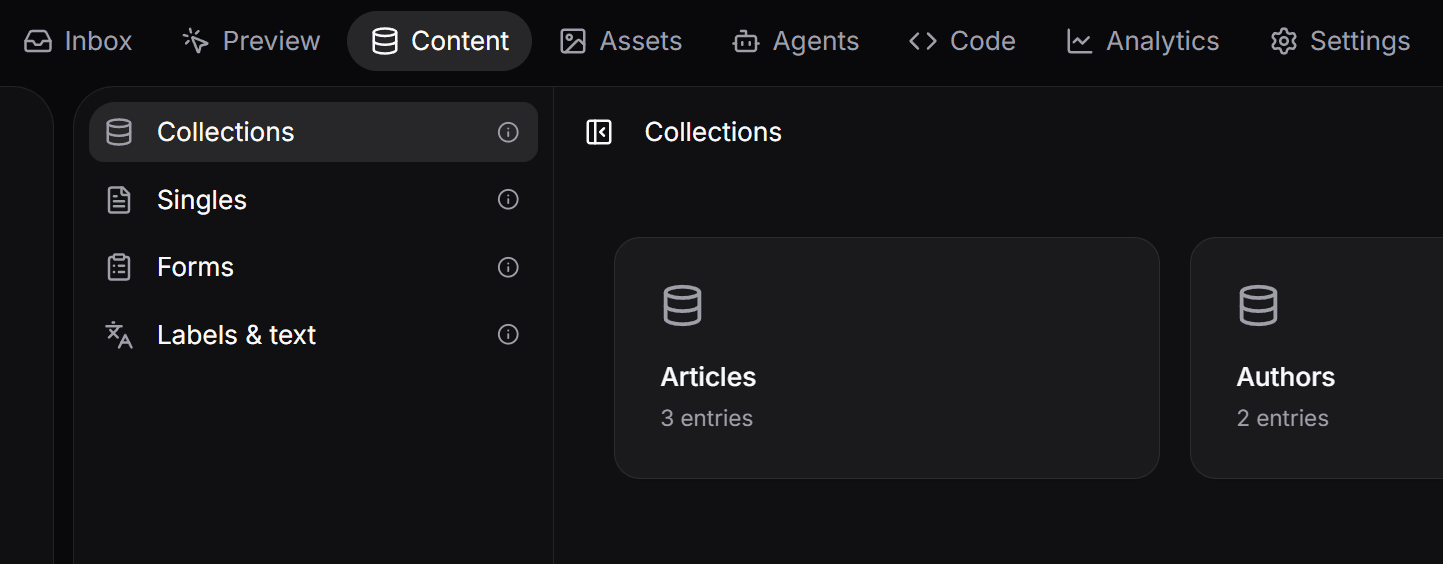
This allows you to easily get familiar with some of the features and workflows available in any Fimo project. For example, notice a few of the menu options:
- Content – Here you'll find categorized content snippets, forms, and reusable interface copy.
- Assets – Fimo's built-in CDN holds all your media content (images, videos, etc.)
- Agents – Here you'll be able to view and manage your agents and their upcoming tasks, filtering by status.
- Code – The Code tab demonstrates that every Fimo project is nothing but code – there's no vendor lock-in, no black box, it's just a regular project that you can move anywhere.
The different menu options in Fimo's CMS
Working with Branches in Fimo
One of the powerful features in Fimo is the ability to make edits in a fully isolated environment. For example, rather than editing content directly on the main branch (which you can do visually without coding), you can instead create a new branch to work on.
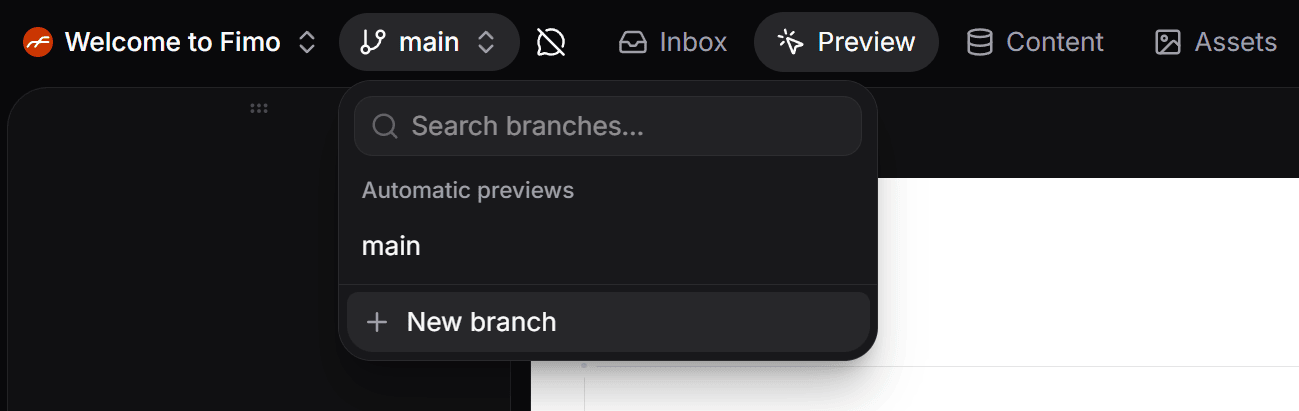
In the top left area of the menu, you'll see the "main" branch menu option. Click on that to view a drop down. Here you can search all your branches or create new ones.
Creating a new branch for a project in Fimo
Once the new branch is created, make sure you're on it (it will now display in the menu instead of "main") and any edits you make take place on this full, disposable copy of your site, all with its own server, database, and asset bucket. Even your agents can experiment freely here without touching the main branch.
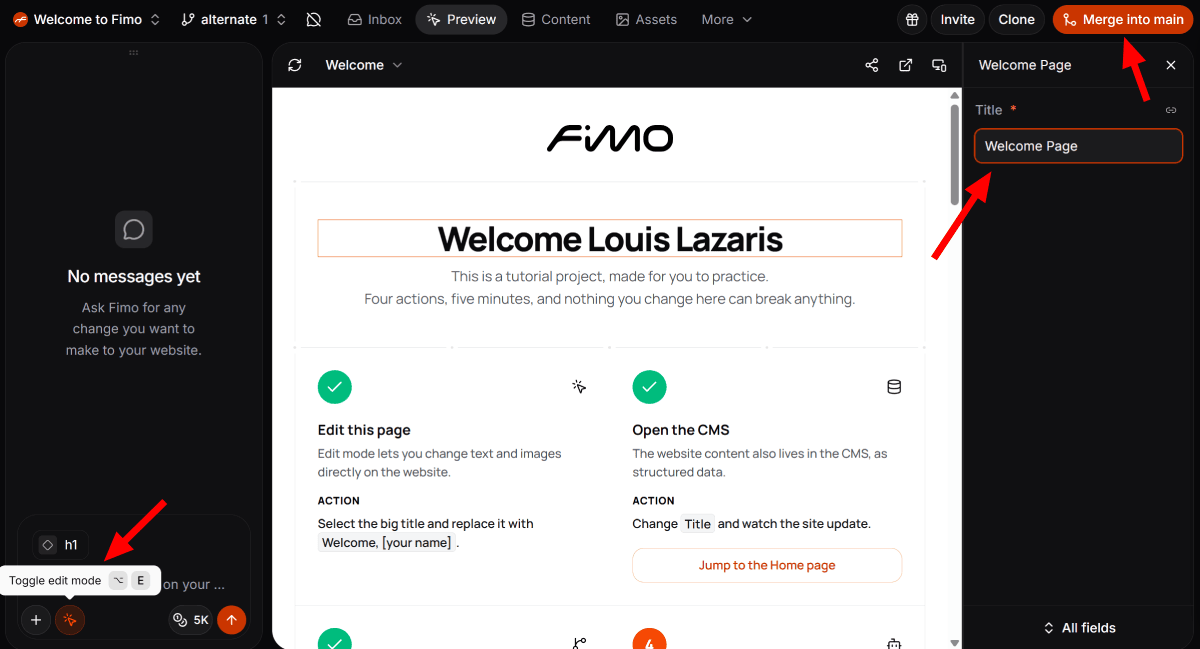
You can make changes visually by clicking the "Toggle edit mode" button on the "Preview" tab. The "Toggle edit mode" button is found in the "Chat" sidebar on the left.
Editing a branch and merging to Main in Fimo
Once you've made changes, you can discard them by deleting the branch, make further edits, or use the "Merge into main" button in the top-right (see screenshot above) to merge them into your main branch, ready for production.
Using Agents to Put Your Site on Autopilot
In Fimo, agents may end up being your favourite feature. Your agents live in your codebase inside `.fimo/agents`, with skills built in. With agents, you can set up automated runs that work based on schedules and events. Each agent run gets its own branch and isolated sandbox where you can review, preview, diff, and merge.
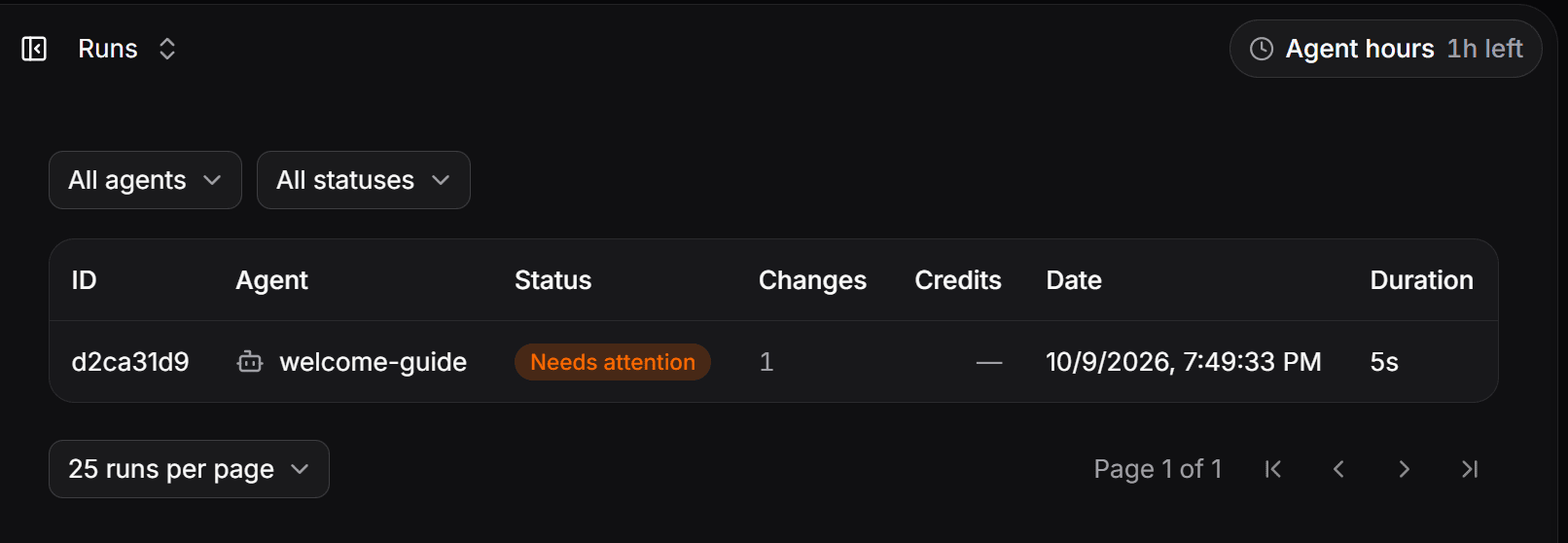
In the example website when you sign up, there's a "welcome-guide" agent to help get you familiar with how agents work. This agent has generated a footer update that you can review before merging it into main. As shown in the screenshot below, this change is listed in your agents tab as "Needs attention".
From there, you can select the agent run from the list, review the change, then click the "Accept changes" button. This lets you review the commits one last time before merging to the main branch.
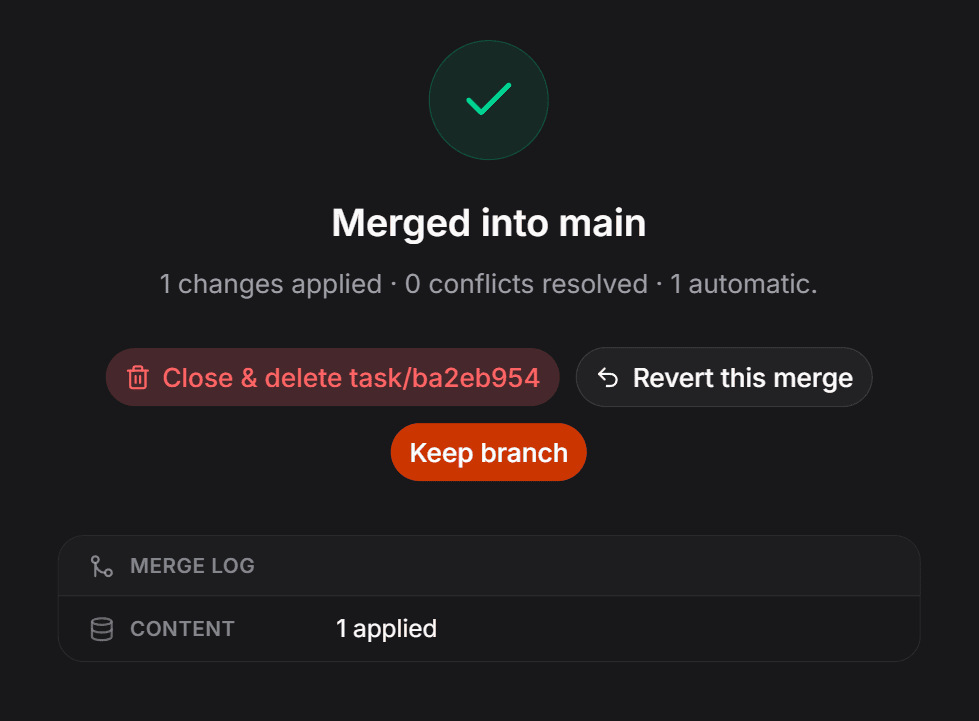
The final step of a branch merge in Fimo
On the final merge step, you'll have the option to keep this separate branch, merge the changes and delete the branch, or revert the merge if you change your mind (see image above).
If you've got a marketing or SEO team that wants to keep website content fresh and ranking well, Fimo's Agents feature will be a huge benefit. Here, anyone can set up agents to check on site SEO and AI-friendly content, editing copy according to regular schedules, or even in response to competitor websites that may have recently been updated. All of this can be automated so your site is updated on schedule, with your team's final approval.
Open Your Site in Your Coding Tool
One final powerful feature that I'll mention here is the ability to use your current AI coding stack with a new or existing site, and hook it right into Fimo, allowing you to use all the features I've discussed above, and more.
When starting a new project, Fimo gives you the option to start from scratch or set up Fimo with an existing project. You can choose the Agent setup or Manual setup.
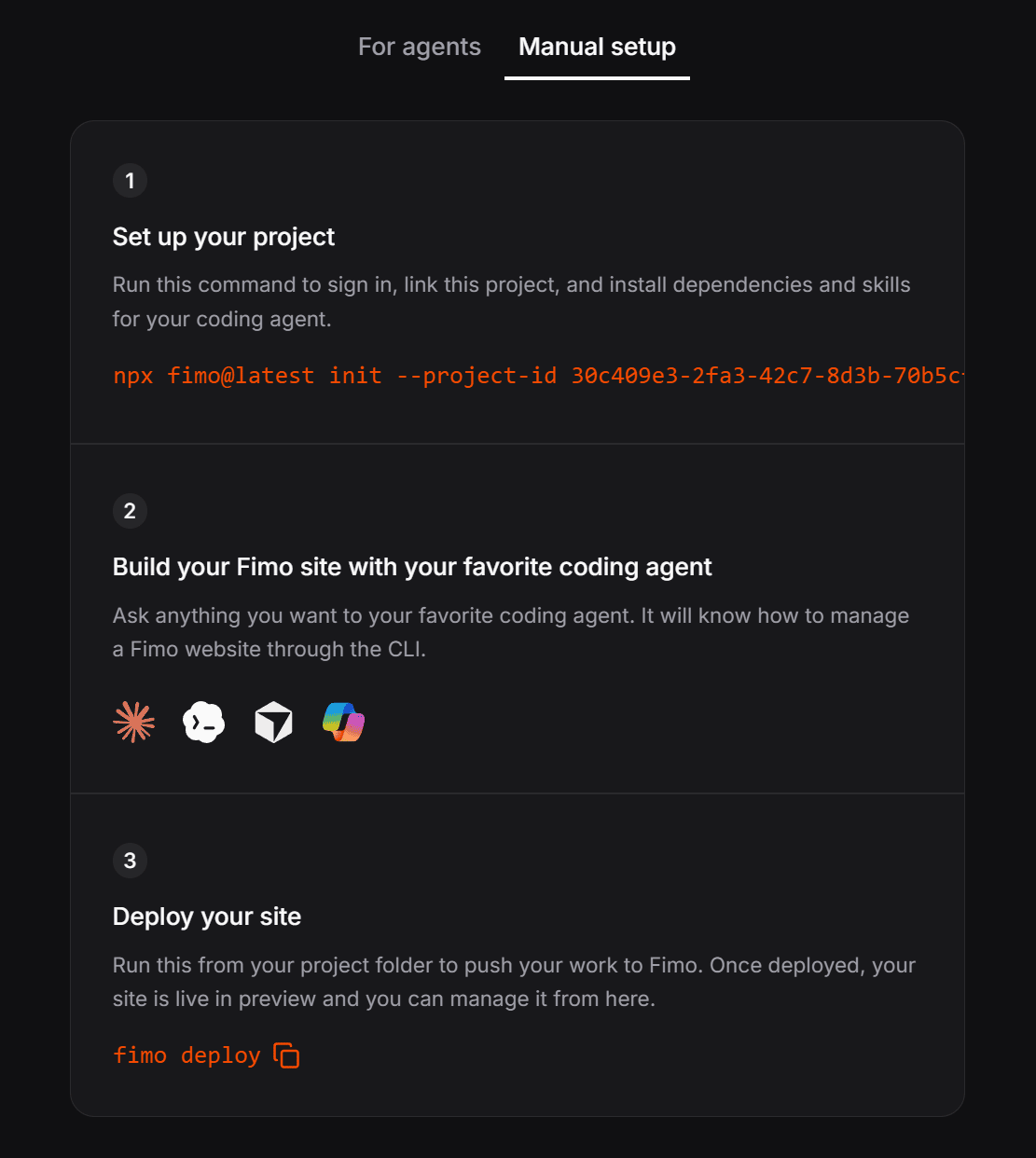 |
Setting up a project with your own coding stack in Fimo
With this integration, your project works like any other project, complete with real Git history, branches, and so on. Fimo works like a transparent layer on top of your project, and your team responds by reviewing diffs before they're merged, working with all of your existing tools.
Try Fimo for Free Today
For more info on all the features I've discussed here and others, check out the Fimo docs. There's lots of info there for whatever workflow you choose.
You can try out Fimo using the free plan, no credit card required, before checking out the pricing options, which include a pay-as-you-go plan and the Pro plan.
Now on to this week's tools!
|
| |
CSS & HTML Tools
lift-html — A tiny library for building HTML Web Components (and CSS Web Components), that are meant to enhance existing HTML on the page instead of rendering it on the client or hydrating it.
Grid Lanes — An interactive demo page from the WebKit team on producing masonry-style grids with just a few lines of CSS, no JavaScript and no hacks.
CSS Units — A reference website that explains all 60+ CSS units, with live examples, covering everything from px and rem to new units like ofsvh, dvh and cqi.
Fast VPN Bundle for Unlimited Devices — Easy setup, no complicated configurations. Connect multiple devices at the same time and protect your entire household with one account. Malware protection, spam prevention, ad blocking, and a dedicated IP. SPONSORED
njX UI — A CDN-first CSS library for building landing pages fast with ready-made components, utilities, fluid typography, and motion helpers, with no framework and no build step.
FixCSS — A JavaScript library that attempts to fix the apparent errors in the CSS spec, as outlined by the CSS Working Group, converting corrected property names, values, selectors, and syntax into spec-adhering CSS that browsers support.
dompdf.js — A pure-frontend HTML-to-PDF engine powered by TypeScript, Web Workers, Rust, and WebAssembly.
Design Tokens Visualizer — An interactive tool for exploring design tokens that allows you to explore and understand the relationships between design tokens and components across your design system.
|
Testing & Debugging Tools
LangWatch — An open source platform for AI in production, enabling teams to trace, test, route and govern every LLM call in your company, from the agents you build to the coding assistants your engineers use.
mochi.js — A Bun-native browser automation framework focused on stealth as a first-class architectural concern rather than a layer of patches over Playwright or Puppeteer.
Schema Benchmarks — A project that compare the performance of different schema validation libraries in detail, including separating each step of the process.
Get $5k Free AWS Credits & Stop Out-of-Pocket Burn — Stop wasting runway on hosting bills. Learn the exact validation process to unlock $5,000 in free AWS credits, plus up to $400K in software stacks (Stripe, HubSpot & Notion) in under 2 hours. Step-by-step video manual with real proof. SPONSORED
React Native Doctor — React Doctor for React Native to find issues in your React Native apps, including correctness, performance, security, accessibility, and maintainability issues.
n8n-check — A utility that provides real n8n workflow regression checks, with JSON fixtures, local HTTP mocks, exact request/output assertions, and JUnit reports.
webvitals.fyi — A directory of 29 curated, opinionated web performance tools, with rankings for each one based on different roles (frontend, perf engineer, marketer, etc).
env.style — A unique little utility that lets you add custom favicons to different development environments (production, dev, preview, etc.) so you can quickly use different open tabs without confusion.
|
An Office That Grows At The Same Rate You Do
Most office decisions force a guess: how big will the team be in three years? Guess high, you pay for empty desks. Guess low, you're renegotiating a lease mid-sprint.
Regus removes the guesswork. Private, fully equipped offices that flex with your team – start with two desks, scale to a full floor, or move to a bigger space in the network whenever you're ready. One simple monthly price covers everything: internet, cleaning, utilities, and admin support. No extra fees, no surprises.
Web Tools Weekly readers can see spaces, layouts, and pricing for their team in under two minutes – no commitment required.
Availability, pricing, and configurations vary by location. Part of the IWG Network.
Find Your Team's Workspace 🡺
|
The Uncategorizables
Cap — A self-hosted CAPTCHA solution for the modern web that has no Google., no telemetry, no visual puzzles, and you can switch from reCAPTCHA in minutes.
DevSexy — A suite of thirty-five private web tools for JSON, JWTs, certificates, text, code, and data, with everything running locally in your browser, with an optional paid macOS app.
Astro Playground — A live playground for Astro, the popular web framework for building content-driven websites like blogs, marketing, and e-commerce.
AI Trading Bot with Full Source Code — Imagine an AI assistant that monitors 70+ crypto markets every 5 minutes, identifies high-momentum setups, enters positions automatically, manages layered take-profits, and sends you Telegram alerts for every action. SPONSORED
r4ck — A resource that lists every VPS, cloud, bare metal, GPU and PaaS offer for sale, searchable by spec, price and place.
QuickTiny — An online collection of tools, this one with an AI text field that lets you paste in some text and it will provide options for what you likely want to do with the text (format, convert, compress, etc).
Markdy — A diagram-native domain-specific language (DSL) for creating animated architecture diagrams by compiling declarations into fluid Web Animations API motion without canvas overhead or manual coordinate math.
.MD this page — A browser extension that lets you turn any webpage into clean, LLM-ready Markdown in one click, so you can strip the clutter, keep the structure, then copy or download instantly.
|
|
Commercial Apps & Classifieds
Quote Studio – An HTML kit to build an estimate calculator for selling cleaning business services.
|
|
Learn VS Code – 150+ tips and customizations for VS Code, the world's most popular IDE. AD
|
Vachi – Get 2X usage from your Claude plan with plug-n-play smart context optimization.
|
|
Elementor MCP – Connect Claude, Codex, Cursor, and other AI tools to your Elementor site.
|
Tech Productivity – The latest tools, articles, and tips on productivity, focus, work culture, and more. AD
|
|
Drupal Themes – Professional and customizable Drupal themes for businesses, filterable by category.
|
Statable – A privacy-friendly web analytics platform with no cookies and and no consent banner.
|
|
|
A Social Post for Thought
One of the most prolific open source developers has announced that he's disabled external PRs on all his repos. Due to AI, of course, and it's explained more in the thread, but it certainly feels like this is something we're going to see more of.
Send Me Your Tools!
Made something? Reply to this email or send links via Direct Message on X or via chat on Bluesky (details here). No tutorials or articles, please. If you have any suggestions for improvement or corrections, feel free to reply to this email.
Before I Go...
Here's a cool idea that someone put into reality: Movie Scene Map is an interactive app that lets you find locations where movies and TV shows were filmed. You can search a title to see where it was filmed or pick a location to see what was filmed there.
Thanks to all for subscribing and reading!
Keep tooling,
Louis
webtoolsweekly.com
@LouisLazaris
|
|
|